How to Turn Bank Statements into a Profit and Loss Statement
Your bank statement shows $80,000 in deposits and $55,000 in withdrawals for the year. Does that mean your business earned $25,000?
Not necessarily. Some deposits might be transfers from another account or money received from a loan. Some withdrawals might be personal purchases, loan repayments, or transfers to a credit card. None of these automatically count as business revenue or expenses.
To prepare a profit and loss statement from bank transactions, you need to identify which amounts belong in your business income and expenses, then make any adjustments required by your accounting method.
Step 1: Gather Your Bank and Credit Card Statements
Start by collecting statements for the period you're preparing. If you're creating an annual profit and loss statement, you'll need transactions covering the full year.
Include all accounts used for business activity, including credit cards. If you paid business expenses from a personal account, you'll need those records as well.
Most banks offer transaction downloads in CSV or Excel format. These are usually easier to work with than PDFs because the dates, descriptions, and amounts are already separated into columns.
If you only have PDF statements, you can convert them to Excel using a PDF conversion tool or Excel's PDF import feature, where supported (see How to Convert PDF Bank Statements to Excel for Bookkeeping). Check the results against your original statements to make sure no transactions were missed or duplicated.
Once your transactions are in Excel, organize them into columns showing the date, description, amount, and category.
Step 2: Remove Transactions That Aren't Income or Expenses
Before calculating your profit, identify transactions that don't belong on your profit and loss statement.
Consider the following example from a sole proprietor's bank account:
| Transaction | Amount | Treatment |
|---|---|---|
| Customer payments | +$12,000 | Business revenue |
| Transfer from personal savings | +$3,000 | Owner contribution |
| Business loan received | +$5,000 | Loan liability |
| Software subscriptions | -$400 | Business expense |
| Office supplies | -$300 | Business expense |
| Transfer to personal account | -$2,000 | Owner withdrawal |
| Credit card payment | -$1,500 | Credit card liability payment |
The account received $20,000 in deposits, but only $12,000 represents business revenue. The remaining $8,000 came from personal savings and a loan.
Similarly, not all withdrawals represent business expenses. The personal withdrawal isn't deductible, and the credit card payment isn't an expense by itself. You'll need to review the individual purchases on the credit card to determine which amounts belong in your expenses.
This distinction is important because including transfers and loan transactions in your income or expenses can significantly distort your reported profit.
Step 3: Categorize Business Expenses
Once you've separated business transactions from transfers and personal activity, organize your expenses into categories.
For example, a freelance consultant might have expenses for software, advertising, insurance, office supplies, travel, and professional fees. Grouping these costs allows you to calculate how much the business spent in each area.
Some purchases need different treatment. A computer or other equipment may be a capital asset rather than an ordinary expense. Vehicle expenses and other costs shared between business and personal use may require an allocation.
You'll also need to consider how sales taxes are recorded. If you're registered for GST/HST in Canada or collect sales taxes in the United States, amounts collected or recoverable may need to be recorded separately from revenue and expenses.
Payment processor deposits also deserve attention. If a customer pays $1,000 and Stripe deposits $970 after deducting a $30 processing fee, your records may need to show $1,000 in revenue and $30 in processing expenses rather than simply recording $970 in sales.
Step 4: Calculate Your Profit and Loss
After categorizing your transactions, you can summarize the amounts to create a profit and loss statement.
For example, assume a consultant has reviewed their records and determined the following amounts for the year:
| Profit and Loss Statement | Amount |
|---|---|
| Consulting revenue | $80,000 |
| Expenses | |
| Advertising | $3,500 |
| Software subscriptions | $2,400 |
| Insurance | $1,800 |
| Office expenses | $1,200 |
| Professional fees | $2,100 |
| Travel expenses | $4,000 |
| Total expenses | $15,000 |
| Net profit | $65,000 |
In this example, the business earned $80,000 in revenue and incurred $15,000 in expenses, leaving a net profit of $65,000.
Excel can calculate these totals using formulas or a pivot table. If your transactions are consistently categorized, you can summarize them by category without manually adding each expense.
This example assumes the revenue and expenses have been recorded correctly and any necessary accounting adjustments have already been made.
Step 5: Check for Transactions Missing From Your Bank Statements
Even after reviewing every bank transaction, your profit and loss statement may not be complete.
Bank statements only show amounts moving through your accounts. They won't necessarily include cash received, business expenses paid personally, unpaid customer invoices, or bills that haven't been paid.
The accounting method your business uses determines when income and expenses need to be reported. Under cash accounting, transactions are generally recognized when money is received or paid, subject to applicable rules. Under accrual accounting, income is generally recorded when earned and expenses when incurred.
This matters when preparing a profit and loss statement for tax purposes.
In Canada, most sole proprietors carrying on a business or professional activity must use accrual accounting for income tax reporting. Certain businesses, including farming, fishing, and self-employed commission businesses, may qualify to use the cash method. In the United States, many eligible sole proprietors use cash accounting.
For example, suppose you issued a $4,000 invoice in December but your customer didn't pay until January. Under accrual accounting, that revenue would generally be included in December's reporting period even though it doesn't appear as a deposit on your December bank statement.
You'll also need to consider inventory, capital assets, prepaid expenses, and other adjustments where applicable.
This is why a report created directly from bank transactions should generally be treated as a starting point until you've confirmed that all required amounts and adjustments are included.
Can You Automate the Process?
If your business has a limited number of transactions, you may be able to prepare a profit and loss statement using Excel (see Can I Use Excel for Sole Proprietor Bookkeeping?). The most time-consuming part is often identifying and categorizing each transaction, particularly when you're working with a full year of statements.
Tools such as Heightly can help with this part of the process. Heightly accepts supported PDF and CSV bank and credit card statements, suggests categories aligned with Schedule C in the United States or Form T2125 in Canada, and produces Excel and PDF Tax Prep Reports.
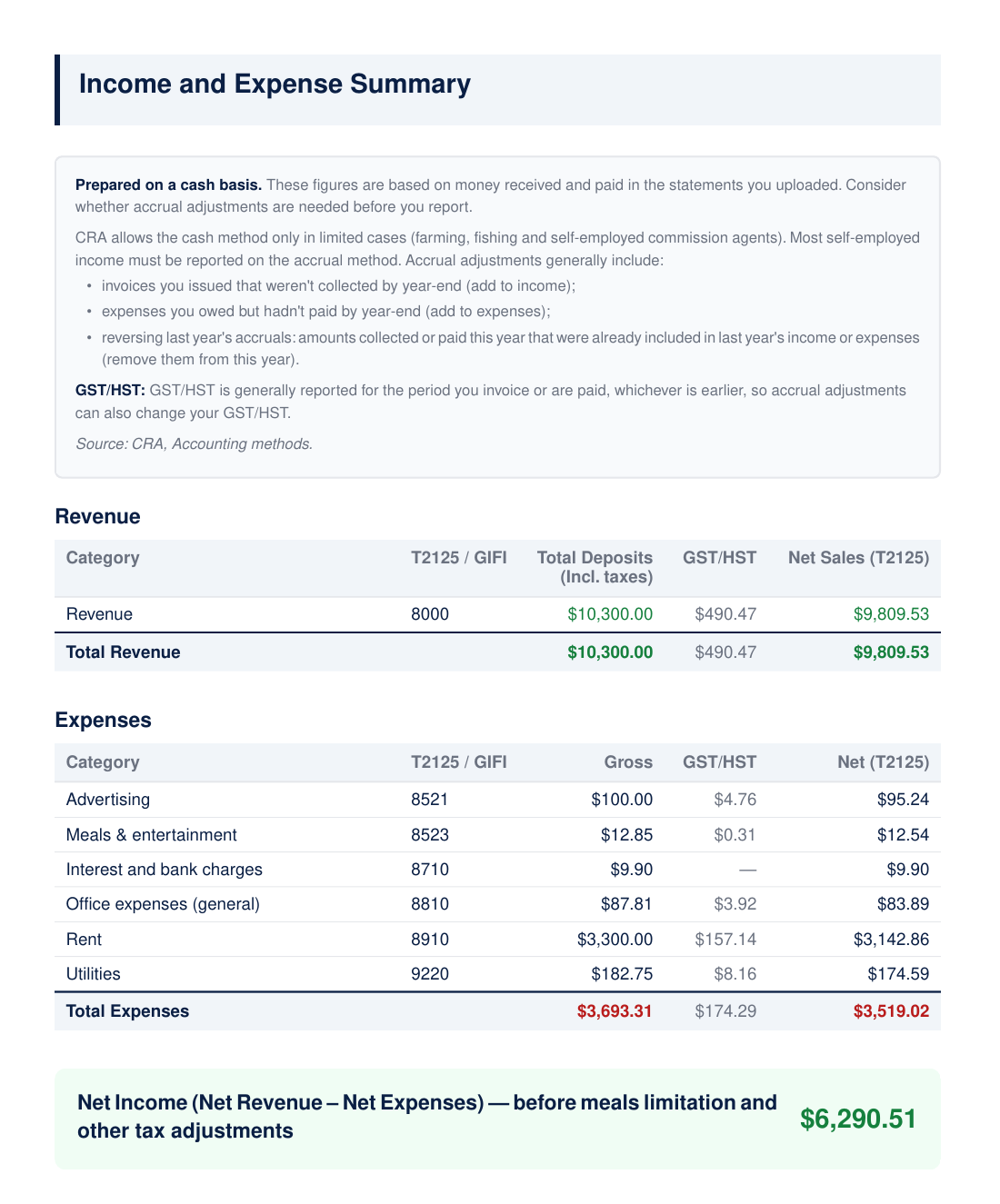
A Heightly Income and Expense Summary, built from sample statements. Figures are illustrative.
The reports provide categorized income and expense information that can help you prepare your annual business tax information or a preliminary profit and loss summary. You'll still need to check for missing transactions and make any adjustments required by your accounting method. Heightly doesn't produce complete financial statements or replace accounting reconciliations.
For businesses that require regular financial statements, invoicing, inventory tracking, or more involved accounting, dedicated accounting software or professional bookkeeping may be more appropriate.
Final Thoughts
You can use bank statements to prepare a profit and loss statement, but the deposits and withdrawals need to be reviewed before calculating your business profit.
Start by gathering your transactions, removing transfers and other non-income-statement items, categorizing your revenue and expenses, and checking for amounts that aren't captured in your bank accounts.
For straightforward businesses, this may be manageable in Excel. If you're working with a full year of statements, Heightly can help organize the transactions into tax categories and reduce the manual work involved.
The important part is making sure your final profit and loss statement reflects your business activity, not simply the movement of money through your bank account.
Heightly currently supports eligible sole proprietors in Canada (excluding Quebec) and the United States. It is a tax preparation organization tool, not a complete accounting system or a replacement for professional accounting or tax advice.
Note for Quebec residents: The Service is not available to Quebec residents. See heightly.ai/app/quebec-not-supported for details.
This article is for general informational purposes only and is not tax, legal, or accounting advice. Rules vary by province, state, and business type, and change often — confirm details with a qualified tax professional (or the CRA / IRS directly) before filing. Heightly is software, not a tax filing service.
Turn your bank statements into a Tax Prep Report
Try Heightly free — turn your bank statements into a tax prep report in minutes.
Get started free →