Catch-Up Bookkeeping for Sole Proprietors: DIY, Software or a Bookkeeper?
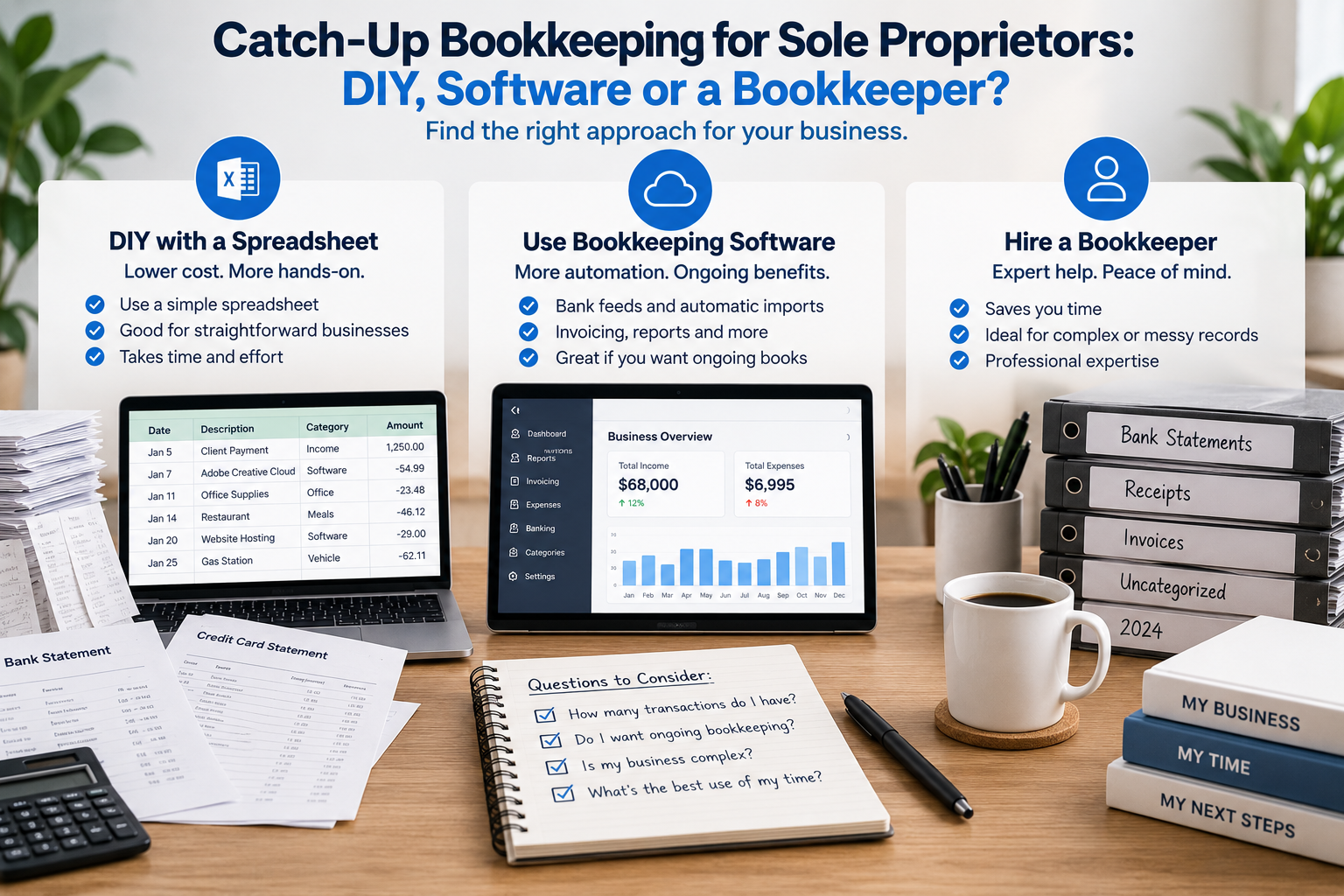
You're behind on your bookkeeping and need to get caught up.
Now comes the next question:
Should you do it yourself, use bookkeeping software, or hire a bookkeeper?
For a sole proprietor with relatively straightforward finances, all three can be reasonable options. There's also a middle ground: tools that help organize historical transactions without requiring you to set up a complete bookkeeping system.
The right choice depends on what your business looks like, how far behind you are, how many transactions you have and what you need from your bookkeeping once you're caught up.
A freelancer with one bank account and 300 transactions has a very different bookkeeping problem from a business with employees, inventory, sales taxes, several accounts and unpaid customer invoices.
This guide compares the main ways a sole proprietor can complete catch-up bookkeeping and helps you decide which approach makes sense for your situation.
What is catch-up bookkeeping?
Catch-up bookkeeping is the process of bringing financial records that have fallen behind up to date.
Perhaps you haven't done any bookkeeping for several months.
Perhaps you haven't done it all year.
Or maybe tax time has arrived and you need to reconstruct your business income and expenses from bank statements, credit-card statements, receipts and invoices.
For a straightforward sole proprietor, catch-up bookkeeping might primarily involve:
- gathering bank and credit-card statements
- identifying business income
- separating business and personal transactions
- categorizing expenses
- identifying significant purchases
- reviewing unclear transactions
- gathering supporting documentation
- preparing annual income and expense totals
For a more complicated business, catch-up bookkeeping can involve much more, including bank reconciliations, accounts receivable, accounts payable, payroll, inventory, sales taxes, loans and adjusting entries.
That distinction matters when deciding whether to do the work yourself.
If you want the actual step-by-step process, see our How to Catch Up on a Year of Bookkeeping guide.
If you're at the earlier "I haven't done any bookkeeping all year—where do I even start?" stage, start with I Haven't Done My Bookkeeping All Year — What Do I Do?
What are your options if your bookkeeping is behind?
Most sole proprietors have four practical options:
- Do the catch-up bookkeeping yourself using a spreadsheet
- Set up or update bookkeeping software
- Hire a bookkeeper
- Use a tax-time organization tool to help process historical transactions
There isn't one option that's best for every sole proprietor.
Here's how they compare.
Option 1: Do your catch-up bookkeeping yourself
If your business is straightforward, DIY catch-up bookkeeping may be completely reasonable.
You gather the statements, enter the transactions, identify business income and expenses, categorize everything and prepare a summary.
When DIY bookkeeping can work well
Doing it yourself may make sense if:
- you're a sole proprietor or freelancer
- you have relatively few transactions
- you have only one or two financial accounts
- most transactions are easy to identify
- you don't carry inventory
- you don't have employees
- you don't have significant accounts receivable or payable
- your business and personal spending are reasonably easy to separate
- your records are mostly complete
- you're comfortable working in Excel or a spreadsheet
For example, imagine a self-employed consultant with one bank account and one credit card.
Customers pay by electronic transfer. The main expenses are software, professional fees, telephone, advertising and occasional travel.
That may be a very manageable DIY catch-up project.
How to do catch-up bookkeeping yourself
At a high level, you would:
- Gather the year's statements.
- Create a complete transaction list.
- Identify business income.
- Separate personal transactions.
- Categorize business expenses.
- Flag unclear or unusual transactions.
- Identify significant equipment purchases.
- Add transactions that didn't go through the accounts.
- Review your supporting records.
- Summarize the year.
We've created a free Catch-Up Bookkeeping Excel Template for sole proprietors who want to take this approach.
Download the free Catch-Up Bookkeeping Excel Template (XLSX)
It gives you a place to record transactions, categories, business-use percentages, items requiring review and annual totals without having to build a bookkeeping spreadsheet from scratch.
Advantages of DIY catch-up bookkeeping
The obvious advantage is cost.
If you already have Excel or another spreadsheet program, you may be able to organize the year without paying for bookkeeping services or subscribing to accounting software.
You also see every transaction yourself, which can help you understand where your business earned and spent money.
Disadvantages of DIY catch-up bookkeeping
The biggest cost may be your time.
If you have hundreds or thousands of transactions, manually entering, identifying and categorizing them can take many hours.
There's also more opportunity to:
- miss transactions
- duplicate transactions
- categorize items incorrectly
- overlook expenses paid personally
- treat transfers as income
- overlook unusual tax or accounting issues
A spreadsheet can organize information, but it doesn't provide professional judgment.
DIY is best when the bookkeeping problem is simple enough that you're primarily doing data organization rather than accounting.
Option 2: Use bookkeeping software
Another option is to use accounting or bookkeeping software.
Products such as QuickBooks, Xero and Wave are designed to maintain business accounting records and can provide substantially more functionality than a spreadsheet.
Depending on the product and plan, that can include:
- bank feeds
- transaction categorization
- bank reconciliation
- invoicing
- accounts receivable
- bills and accounts payable
- financial statements
- sales-tax tracking
- integrations with other business systems
When bookkeeping software makes sense
Full bookkeeping software becomes particularly attractive when you don't just want to fix last year.
You want a system for next year too.
It may make sense if:
- you send invoices regularly
- customers owe you money at year-end
- you have bills to track
- you want monthly financial statements
- you need regular bank reconciliations
- you collect sales taxes
- your business is growing
- you want to monitor financial performance throughout the year
- you plan to maintain your bookkeeping regularly going forward
Instead of treating catch-up bookkeeping as an isolated tax-time project, you're establishing an ongoing accounting system.
Can bookkeeping software catch up an entire year?
Yes, but don't confuse having software with having completed bookkeeping.
Historical transactions still need to be imported or entered, reviewed and categorized.
Accounts may need to be reconciled.
Opening balances may need to be established.
Transfers need to be identified correctly.
And transactions that occurred outside the connected accounts still need to be considered.
The software gives you a system in which to do the work. It doesn't necessarily eliminate the catch-up work itself.
Advantages of bookkeeping software
The biggest advantage is continuity.
Once the historical bookkeeping is complete, you have a system you can continue using.
That's valuable if your business needs ongoing books rather than simply an annual summary for tax preparation.
Disadvantages of bookkeeping software
For a very straightforward sole proprietor, a complete accounting system can be more than you need.
There may be:
- subscription costs
- setup time
- a learning curve
- historical cleanup
- additional features you'll never use
If your only objective is to organize one year's bank and credit-card transactions for tax time, setting up a full accounting system retroactively may not be the simplest solution.
The question isn't whether QuickBooks, Xero, Wave or another product can do the job.
They can.
The question is whether you need everything else the software is designed to do.
Option 3: Hire a bookkeeper
Sometimes the best DIY bookkeeping decision is deciding not to DIY.
A professional bookkeeper can reconstruct the historical records, categorize transactions, reconcile accounts and identify issues that might not be obvious to someone without bookkeeping experience.
When should you hire a bookkeeper for catch-up bookkeeping?
Professional help becomes more valuable as complexity increases.
Consider hiring a bookkeeper if you have:
- several bank and credit-card accounts
- a large number of transactions
- substantial mixing of personal and business spending
- missing records
- inventory
- employees or payroll
- sales-tax filings
- loans or financing
- foreign-currency transactions
- significant accounts receivable
- significant accounts payable
- complicated payment processors
- multiple years of bookkeeping to catch up
- financial statements that need to be accurate for purposes beyond your tax return
You may also simply decide that your time is better spent running your business.
A project can be technically possible to DIY without being a good use of your weekend.
What does a catch-up bookkeeper do?
The exact scope varies, but a bookkeeper may:
- gather or import transactions
- organize historical records
- categorize income and expenses
- reconcile bank and credit-card accounts
- identify missing information
- investigate unusual transactions
- record loans and other balance-sheet items
- prepare financial reports
- get the books ready for your accountant or tax preparer
The more complex the business, the more important these accounting functions become.
Advantages of hiring a bookkeeper
You get professional bookkeeping expertise and save your own time.
A bookkeeper may also recognize issues that you wouldn't know to look for.
Disadvantages of hiring a bookkeeper
Cost is the obvious disadvantage.
Catch-up bookkeeping can be more expensive than regular ongoing bookkeeping because someone has to reconstruct months of historical activity at once.
The cost will depend on factors such as:
- number of months behind
- number of accounts
- transaction volume
- quality of your records
- complexity of the business
- amount of cleanup required
We cover this separately in our cost guides — for the United States and for Canada.
Option 4: Use a tool to organize your historical transactions
There is also a middle ground between manually entering everything into Excel and establishing a full accounting system.
Some sole proprietors don't really need ongoing bookkeeping software.
Their immediate problem is much narrower:
"I have a year's worth of bank and credit-card statements and need to turn them into organized income and expense information."
This is particularly common with straightforward freelancers, consultants and other service businesses.
A tax-time transaction organization tool can help automate the mechanical part of that process.
Where Heightly fits
This is the problem Heightly was built to address.
Instead of manually entering each transaction into our free spreadsheet, you upload your bank and credit-card statements.
Heightly helps:
- extract the transactions
- organize them into possible categories
- identify items requiring your review
- separate transactions you identify as personal
- align categories toward Schedule C in the United States or T2125 in Canada
- create an organized PDF and Excel report
You still review the results.
Heightly doesn't know the business purpose of every transaction, determine whether an expense is deductible in your particular circumstances, or replace an accountant or tax professional.
It also isn't intended to replace full bookkeeping software for businesses that need an ongoing accounting system.
It's designed for the gap between:
"I'll manually enter my whole year into Excel"
and
"I need to establish complete books in an accounting system."
DIY spreadsheet vs bookkeeping software vs bookkeeper vs Heightly
Here's a simple way to think about the options.
| Your situation | Option to consider |
|---|---|
| Straightforward sole proprietor, few transactions, comfortable with Excel | DIY spreadsheet |
| Straightforward sole proprietor, lots of historical bank/credit-card transactions | Tax-time organization tool such as Heightly |
| Want ongoing bookkeeping and accounting records | Bookkeeping software |
| Inventory, payroll, receivables, payables or complicated accounting | Bookkeeper and/or accounting software |
| Records are incomplete or transactions are difficult to understand | Bookkeeper |
| Several years behind | Professional help may be appropriate |
These aren't rigid rules.
You can also combine approaches.
For example, you might use software but hire a bookkeeper to clean up the historical records. Or you might organize straightforward transactions yourself and ask your accountant about a handful of unusual items.
Is it cheaper to do your own bookkeeping?
In dollars, usually.
In time, not necessarily.
Suppose you have 800 transactions to review.
Even if each transaction takes an average of only 30 seconds to enter, identify and categorize, that's nearly seven hours of work before considering:
- gathering statements
- investigating unknown transactions
- finding receipts
- identifying missing items
- reviewing the totals
- fixing mistakes
And 30 seconds per transaction may be optimistic when records are messy.
That doesn't mean you should hire someone.
It means the right comparison isn't:
Free vs paid.
It's:
Your time + the tools you need + the complexity and risk of the work vs the cost of getting help.
For someone with 150 straightforward transactions, Excel may win easily.
For someone with 1,500 messy transactions, the calculation can look very different.
Do sole proprietors need bookkeeping software?
Not every sole proprietor needs the same bookkeeping system.
A self-employed consultant with simple finances has different needs from a retailer carrying inventory or a contractor managing employees and unpaid customer invoices.
The IRS is explicit that there is no single required system: you may choose any recordkeeping system suited to your business that clearly shows your income and expenses, and except in a few cases the law does not require any special kind of records — though the business you are in affects the type of records you need.
The CRA takes a similar position. It requires records supporting your income and expense claims and states plainly that it does not issue record books nor suggest any particular type of book or set of books, noting that many bookkeeping systems are available and that computerized records are acceptable provided they are clear and easy to read.
So the question isn't simply:
"Am I self-employed?"
It's:
"What records does my particular business need?"
A spreadsheet may be sufficient for one business while being completely inadequate for another.
Does catch-up bookkeeping have to be done before filing taxes?
Your business income and expenses need to be sufficiently determined and supported to prepare an accurate tax return.
For sole proprietors:
In the United States, business income and expenses are generally reported on Schedule C (Form 1040).
In Canada, business or professional income and expenses are generally reported using Form T2125, Statement of Business or Professional Activities.
If the underlying bookkeeping hasn't been completed, it can be difficult to know what amounts belong on those forms.
That's why catch-up bookkeeping often becomes urgent as tax filing approaches.
What if my bookkeeping is very messy?
Messy doesn't automatically mean you need a professional.
Ask what is actually making it messy.
Mostly transaction volume?
If you have straightforward transactions but simply have a lot of them, automation may solve much of the problem.
Mostly personal and business spending mixed together?
You may still be able to work through it yourself, but expect more review.
Missing receipts?
You'll need to reconstruct the documentation you can. See What Your Bank Statement Doesn't Prove for more information about recordkeeping.
Don't recognize many transactions?
That increases the amount of investigation required but doesn't necessarily make the accounting complicated.
Payroll, inventory, loans, sales taxes, receivables and payables?
Now the problem is moving beyond transaction categorization.
That's where professional bookkeeping becomes much more valuable.
The distinction worth making is:
A large amount of simple bookkeeping is not necessarily complicated bookkeeping.
Five hundred ordinary bank transactions can be tedious without being technically difficult.
Twenty unusual accounting transactions can be the opposite.
What if I only need the bookkeeping for my accountant?
This is another important distinction.
If your accountant has asked you to provide organized income and expenses for your sole proprietorship, you may not need to build a complete accounting system solely for that purpose.
You may simply need to turn the year's financial activity into records your accountant can work with.
We've written a separate guide on How to Prepare Your Bank Statements for Your Accountant.
Before doing the work, it's also reasonable to ask your accountant exactly what they want.
Some accountants may prefer:
- an Excel summary
- categorized transactions
- bookkeeping software
- copies of statements
- supporting schedules
- specific tax information
Providing information in the format they actually need can save both of you time.
A simple decision tree
If you're trying to decide what to do, start here.
Is your business financially complicated?
If yes → Consider a bookkeeper and proper accounting software.
If no ↓
Do you want ongoing books and accounting records throughout the year?
If yes → Consider bookkeeping software.
If no ↓
Are you comfortable manually entering and categorizing your transactions?
If yes → Use a spreadsheet.
Download our free Catch-Up Bookkeeping Excel Template (XLSX)
If no ↓
Are your transactions primarily contained in bank and credit-card statements?
If yes → A statement-organization tool such as Heightly may be a good fit.
If no → Consider whether professional bookkeeping help would be more appropriate.
The right solution is the one that matches the problem
If you're behind on your bookkeeping, don't automatically assume you need the most sophisticated solution.
You also shouldn't automatically choose the cheapest one.
Start by looking at your business.
If you have a straightforward sole proprietorship and a manageable number of transactions, a spreadsheet may be all you need.
If you want an ongoing accounting system, bookkeeping software may make more sense.
If your records involve substantial accounting complexity, a bookkeeper can be worth the cost.
And if your business is straightforward but you're staring at a year's worth of statements and don't want to enter hundreds of transactions manually, a tool like Heightly can fill the gap.
The objective isn't to have the fanciest bookkeeping system.
It's to end up with complete, organized and supportable financial information that fits the needs of your business.
This article provides general information only and is not accounting, tax or legal advice. Recordkeeping and tax requirements depend on your jurisdiction and individual circumstances. Heightly and the Heightly Catch-Up Bookkeeping Excel Template are organizational tools and do not determine whether an expense is deductible, calculate your tax liability or replace professional advice. Consult a qualified professional regarding your specific circumstances.
Note for Quebec residents: The Service is not available to Quebec residents. See heightly.ai/app/quebec-not-supported for details.
This article is for general informational purposes only and is not tax, legal, or accounting advice. Rules vary by province, state, and business type, and change often — confirm details with a qualified tax professional (or the CRA / IRS directly) before filing. Heightly is software, not a tax filing service.
Turn your bank statements into a Tax Prep Report
Try Heightly free — turn your bank statements into a tax prep report in minutes.
Get started free →