How to Catch Up on a Year of Bookkeeping: A Step-by-Step Guide
If you're a year behind on bookkeeping, the hardest part can be figuring out where to start.
You may have twelve months of bank statements, credit-card purchases, receipts and deposits to sort through. Perhaps you mixed some personal and business expenses. Maybe you started keeping records in January but stopped a few months later.
Whatever happened, the bookkeeping still needs to get done.
The good news is that catching up on a year of bookkeeping is possible, particularly for a straightforward sole proprietor or freelancer.
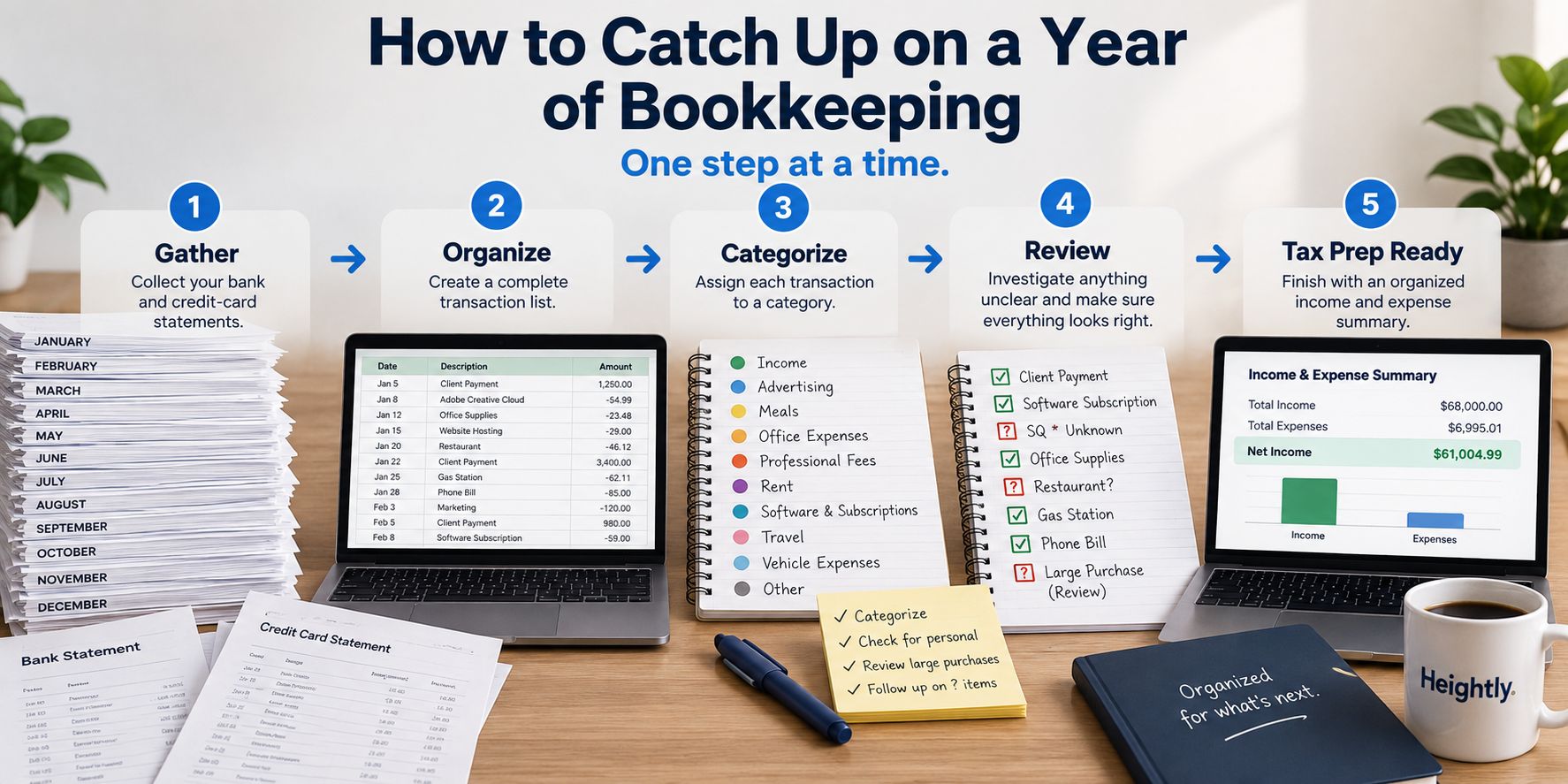
The process is essentially the same whether you're in the United States or Canada: gather your financial records, build a complete transaction list, identify your business income, separate business and personal spending, categorize expenses, investigate anything unclear and review the completed year.
This guide walks through that process step by step.
If you're looking at your statements and thinking I haven't done any bookkeeping all year, you may also want to start with our guide I Haven't Done My Bookkeeping All Year — What Do I Do?
What is catch-up bookkeeping?
Catch-up bookkeeping means bringing financial records that have fallen behind up to date.
You might need to catch up because:
- you didn't do any bookkeeping during the year
- you stopped updating your books several months ago
- you started a business but never established a bookkeeping system
- you tracked some expenses but not others
- you need organized records for your tax return
- your accountant or tax preparer has asked for your income and expenses
- you have a spreadsheet or accounting file that hasn't been updated
For some businesses, catch-up bookkeeping means updating an existing accounting system and completing bank reconciliations.
For a straightforward sole proprietor who hasn't maintained books during the year, it may instead mean reconstructing the year's business activity from bank statements, credit-card statements, invoices, receipts and other records.
Those are very different projects.
This guide focuses primarily on the second situation: a sole proprietor or freelancer who needs to organize a backlog of transactions, particularly for tax preparation.
How do you catch up on a year of bookkeeping?
A practical catch-up bookkeeping process looks like this:
- Gather every bank and credit-card statement.
- Identify all accounts used for the business.
- Create one complete transaction list.
- Identify and reconcile business income.
- Separate business and personal transactions.
- Categorize business expenses.
- Identify large purchases and unusual transactions.
- Add business transactions missing from your statements.
- Gather supporting records and receipts.
- Review unresolved transactions.
- Review the year as a whole.
- Prepare an organized summary for tax time.
Don't try to solve every tax question while you're completing the first step.
Start by reconstructing what actually happened.
Then deal with the items that require additional review.
Step 1: Gather all of your bank statements
Start with the accounts through which business transactions occurred.
Download statements for the entire year for each relevant bank account.
Before doing anything else, make sure you actually have all twelve months.
It's surprisingly easy to download January through November, overlook December, and begin working with an incomplete year.
Also consider whether you changed banks during the year or closed an account.
Your list might include:
- business checking accounts
- business savings accounts
- personal accounts used for business
- online banking accounts
- other accounts through which customers paid you or business expenses were paid
Create a simple checklist of the accounts and months you've collected.
That gives you a defined starting point.
Step 2: Gather all of your credit-card statements
Next, do the same thing for your credit cards.
Include cards used exclusively for the business as well as personal cards you sometimes used to pay business expenses.
If you used a personal card for both groceries and business software, that doesn't mean every transaction on the card belongs in your bookkeeping.
It means you need to review the card and identify the business transactions.
Again, check that you have the entire year.
At this point, you should have a complete set of statements for the accounts that contain your business activity.
Step 3: Gather your other business records
Bank and credit-card statements are an excellent starting point, but they may not tell the whole story.
Gather other records that may help reconstruct the year, including:
- sales invoices
- payment-processor reports
- emailed receipts
- supplier invoices
- online order histories
- contracts
- cash-sale records
- mileage or vehicle records
- home-office information
- loan documents
- equipment purchase invoices
The IRS provides recordkeeping guidance for self-employed individuals and small businesses, and the CRA provides business-record guidance for Canadian businesses.
Both emphasize maintaining records that support the income and expenses reported on a tax return.
We discuss this issue further in What Your Bank Statement Doesn't Prove: Receipt Recordkeeping for Sole Proprietors.
Step 4: Create one complete transaction list
Now you need somewhere to organize the information.
For a straightforward sole proprietor, this could be a spreadsheet.
At a minimum, record:
- date
- transaction description
- amount
- whether it is income or an expense
- category
- business-use percentage, where applicable
- whether it needs further review
- notes
We've created a free Catch-Up Bookkeeping Excel Template specifically for this process.
Download the free Catch-Up Bookkeeping Excel Template (XLSX)
You can use it to work through your statements manually rather than building a spreadsheet from scratch.
If you already have bookkeeping software and intend to continue using it, you may instead want to bring the historical transactions into that system.
The important thing is to create one organized record of the year's business transactions.
Step 5: Work through the accounts systematically
Once you start entering transactions, use a consistent process.
For example:
Bank account 1 → January through December Bank account 2 → January through December Credit card 1 → January through December Credit card 2 → January through December
Another option is to complete all accounts month by month.
Either approach can work.
What you want to avoid is jumping randomly between statements. That's how transactions get missed or entered twice.
Mark each statement as completed when you finish it.
If you're doing the bookkeeping manually, periodically save a backup copy of your spreadsheet.
Step 6: Identify your business income
Deposits deserve just as much attention as expenses.
Review the money coming into your accounts and determine what each deposit represents.
Possible sources include:
- customer payments
- invoices
- payment processors
- online marketplaces
- cash sales deposited into the bank
- other business income
But don't assume every deposit is revenue.
A deposit might instead be:
- a transfer between your own accounts
- money you contributed personally
- loan proceeds
- a refund
- another non-revenue transaction
Likewise, don't assume every sale appears as an obvious bank deposit.
If payment processors deduct fees before transferring money to you, or customers paid into another account, additional records may be necessary to determine your actual business revenue.
The goal isn't to total the deposits.
The goal is to determine how much business income you actually earned and received according to the accounting method applicable to your business.
Step 7: Separate business and personal expenses
This is often the most time-consuming part of catch-up bookkeeping when personal and business spending have been mixed together.
Review each expense and ask:
Was this incurred for the business?
If the answer is clearly no, exclude it from the business expense totals.
If the answer is yes, categorize it.
If you're unsure, flag it for review.
Don't assume that the account determines the tax treatment.
A personal expense paid from a business bank account is still personal.
A business expense paid using a personal credit card may still need to be included in your business records.
The transaction's purpose matters more than which piece of plastic you used to pay for it.
Step 8: Deal with mixed-use expenses separately
Some expenses aren't entirely business or entirely personal.
Common examples include:
- cell phone
- internet
- vehicle expenses
- home-office expenses
These may require a reasonable allocation or separate calculation.
For example, don't automatically treat 100% of a personal cell-phone bill as a business expense merely because you sometimes use the phone for work.
Our free spreadsheet includes a business-use percentage field to help organize mixed-use items.
That doesn't mean the spreadsheet determines the correct percentage for you.
If you're unsure how a mixed-use expense should be treated for tax purposes, identify it and deal with the calculation separately or discuss it with your tax professional.
Step 9: Categorize your business expenses
Once you've identified the business transactions, group similar expenses together.
Common categories can include:
- advertising
- bank and payment-processing fees
- insurance
- interest
- meals
- office expenses
- professional fees
- rent
- repairs and maintenance
- software and subscriptions
- supplies
- telephone and internet
- travel
- vehicle expenses
- other business expenses
Your bookkeeping categories don't need to be excessively detailed.
A useful category system should make it easy to understand where the business spent money and ultimately prepare the information needed for the tax return.
United States
US sole proprietors generally report business income and expenses on Schedule C (Form 1040).
The IRS publishes Schedule C and its instructions, including the expense categories used on the form.
For more detail, see our Schedule C Line-by-Line Guide to Business Expense Categories.
Canada
Canadian sole proprietors generally report business or professional activities using Form T2125, Statement of Business or Professional Activities.
The categories aren't identical to Schedule C.
For Canadian-specific information, see our guide to categorizing business expenses for Form T2125.
If you're doing universal bookkeeping rather than preparing the tax form itself, concentrate first on accurately identifying what the expense actually was.
Step 10: Flag large purchases instead of guessing
As you work through the year, watch for significant purchases such as:
- computers
- furniture
- tools
- machinery
- equipment
- vehicles
- other long-term assets
A $20 monthly software subscription and a $2,000 computer shouldn't automatically be treated the same way simply because they're both business purchases.
The United States and Canada have different tax rules for capital assets and depreciation.
Your catch-up bookkeeping doesn't need to resolve those rules.
Instead, identify significant purchases separately so they can be reviewed when the tax return is prepared.
Step 11: Investigate transactions you don't recognize
A year later, merchant descriptions can be surprisingly unhelpful.
You may encounter something like:
SP ABC ONLINE — $247.18
and have no idea what it was.
Don't guess.
Try searching:
- your email
- the merchant name
- the exact amount
- online shopping accounts
- digital receipts
- supplier invoices
- your calendar around the purchase date
Sometimes that immediately solves the mystery.
If it doesn't, flag the transaction for review and keep going.
One unknown transaction shouldn't stop you from completing the other 500.
Step 12: Look for transactions missing from the statements
Once the statement activity is organized, ask:
What business activity wouldn't appear here?
Possibilities include:
- expenses paid with cash
- expenses paid from a personal account
- business purchases on another credit card
- income received through another platform
- cash sales
- mileage or vehicle claims
- home-office expenses
- other adjustments requiring separate records
This is why bank statements are a starting point, not necessarily a complete bookkeeping system.
If you want a deeper explanation, read Can I File Self-Employed Taxes With Bank Statements?
Step 13: Deal with missing receipts
If you haven't done your bookkeeping all year, there's a reasonable chance some receipts have disappeared too.
Start reconstructing the documentation you can.
Search:
- vendor websites
- online shopping accounts
- cloud storage
- payment confirmations
- invoice systems
You may be able to download replacement invoices or receipts from many vendors.
A bank or credit-card statement can help establish that a transaction occurred, but it may not establish exactly what was purchased or why it related to your business.
The IRS and CRA both require taxpayers to maintain records supporting amounts reported on business tax returns.
For more on this, see What Your Bank Statement Doesn't Prove: Receipt Recordkeeping for Sole Proprietors.
Step 14: Review your unresolved transactions
By this point, most of the year should be organized.
Now concentrate on the exceptions.
Create a review list containing things such as:
- unknown transactions
- questionable business/personal items
- large equipment purchases
- expenses with missing documentation
- deposits you couldn't identify
- mixed-use expenses
- unusual transactions
This is much more manageable than trying to resolve every difficult transaction the moment you encounter it.
If you're working with an accountant or tax preparer, this list can also make your questions considerably more specific.
Instead of handing over a year's worth of unexplained statements, you're asking about a defined group of transactions.
Step 15: Review the year as a whole
Now zoom out.
Look at your income and expense totals and ask whether they make sense.
Consider:
- Does total revenue seem reasonable?
- Have I included all sources of business income?
- Is any expense category unusually large or small?
- Are personal expenses still included?
- Did I duplicate any accounts or transactions?
- Are any months missing?
- Did I account for expenses paid personally?
- Did I identify major equipment purchases?
- Are there unexplained deposits?
- Are there unresolved transactions?
Our free Excel template includes an income and expense summary so you can review the completed year by category.
This is an important final check.
An individual transaction can look perfectly reasonable while the annual total reveals that something is wrong.
Step 16: Prepare the information for tax time
Once the bookkeeping is complete, you should have:
- organized business income
- categorized business expenses
- significant purchases identified separately
- mixed-use expenses identified
- unresolved transactions listed
- supporting records collected
- annual category totals
That's a much better starting point for preparing a tax return or providing information to an accountant.
But remember:
Completing your catch-up bookkeeping isn't the same thing as completing your tax return.
Tax adjustments may still be required, and bookkeeping software or a spreadsheet can't determine whether every expense is deductible in your particular circumstances.
Should I use Excel, accounting software, a bookkeeper or Heightly?
There isn't one right answer.
It depends on how complicated your business is and how much work you're trying to catch up.
Use a spreadsheet if...
Your business is straightforward, the number of transactions is manageable, and you're comfortable working through the statements yourself.
You can start with our:
Free Catch-Up Bookkeeping Excel Template
This is the lowest-cost option, but you have to manually enter and categorize the transactions.
Use accounting software if...
You want to establish an ongoing bookkeeping system and continue maintaining proper books throughout the year.
Software such as QuickBooks, Xero or Wave provides much more functionality than a spreadsheet or tax-time organization tool.
If you need invoicing, receivables, payables, reconciliations or ongoing financial reporting, full bookkeeping software may be a better fit.
Hire a bookkeeper if...
Your records are complicated, you're substantially behind, or you don't want to do the work yourself.
Professional assistance becomes particularly valuable when you have things like:
- inventory
- payroll
- sales taxes
- loans
- multiple currencies
- substantial accounts receivable
- substantial accounts payable
- numerous accounts
- complicated transactions
Use Heightly if...
You're a relatively straightforward sole proprietor and the biggest problem is simply:
"I have a year's worth of bank and credit-card statements and don't want to enter all of these transactions manually."
That's the problem Heightly was designed to solve.
You upload your bank and credit-card statements. Heightly extracts the transactions, organizes them into possible tax categories and flags items that need your review.
It can then produce an organized PDF and Excel report aligned toward:
- Schedule C categories in the United States, or
- T2125 categories in Canada.
You still review the transactions, and Heightly doesn't determine whether an expense is deductible or replace professional tax advice.
It's simply a faster way to complete much of the mechanical work involved in organizing a year of statements.
How long does it take to catch up on a year of bookkeeping?
There isn't a standard answer.
A freelancer with one account and 25 transactions a month has a very different catch-up project from a business with five accounts and 1,000 monthly transactions.
The time required depends on factors such as:
- number of transactions
- number of accounts
- quality of your records
- how much personal and business spending was mixed
- missing receipts
- unknown transactions
- complexity of the business
- whether you're entering transactions manually or importing/extracting them
- whether the books need formal reconciliations
If your business is straightforward, the project may be manageable on your own.
If it isn't, getting professional help may save considerable time and reduce the risk of errors.
Should I catch up month by month or do the whole year at once?
Usually, work through the records in a defined sequence rather than trying to think about the entire year at once.
For example:
Account 1 → January to December → Complete
Then:
Account 2 → January to December → Complete
And so on.
This creates small, finishable sections.
You can then review the entire year after all the accounts have been processed.
What if I'm more than one year behind?
Use the same process, but complete one tax year at a time.
Don't mix multiple years into one spreadsheet or transaction list.
Start with the year that needs attention first, gather the complete records for that period, finish it, and then move to the next year.
If you have several years of unfiled tax returns or significant missing records, consider speaking with a qualified tax professional. The consequences and appropriate filing strategy can depend heavily on your circumstances and jurisdiction.
How to avoid another year of catch-up bookkeeping
Once you're finally caught up, decide whether you want to do things differently going forward.
You might:
- maintain bookkeeping software throughout the year
- update a spreadsheet monthly
- hire a bookkeeper
- use a dedicated business bank account and credit card
- store receipts electronically
- schedule a monthly bookkeeping session
- organize your statements at regular intervals
You don't necessarily need a complicated accounting system.
But spending a small amount of time throughout the year can make next year's tax preparation much easier.
Start with the first statement
A year of backlogged bookkeeping feels overwhelming when you think about it as one job.
It becomes much more manageable when you turn it into a sequence:
Gather → Enter → Identify → Categorize → Review → Summarize.
If you want to do the work yourself, download our free Catch-Up Bookkeeping Excel Template and start with your first statement.
Download the free Catch-Up Bookkeeping Excel Template (XLSX)
If you have a straightforward business but don't want to manually enter a year's worth of transactions, Heightly can organize your bank and credit-card statements for you.
Whichever approach you choose, don't start by trying to solve the entire year.
Start with the first account.
Then the first statement.
Then the first transaction.
And keep going.
This article provides general information only and is not accounting, tax or legal advice. Tax and recordkeeping requirements depend on your jurisdiction and individual circumstances. The Heightly Catch-Up Bookkeeping Excel Template and Heightly software are organizational tools and do not determine whether an expense is deductible, calculate your tax liability or replace professional advice. Consult a qualified professional regarding your specific circumstances.
Note for Quebec residents: The Service is not available to Quebec residents. See heightly.ai/app/quebec-not-supported for details.
This article is for general informational purposes only and is not tax, legal, or accounting advice. Rules vary by province, state, and business type, and change often — confirm details with a qualified tax professional (or the CRA / IRS directly) before filing. Heightly is software, not a tax filing service.
Turn your bank statements into a Tax Prep Report
Try Heightly free — turn your bank statements into a tax prep report in minutes.
Get started free →