Bookkeeping Not Done? Turn Bank Statements Into a Schedule C Report
Your bookkeeping isn't done. Your taxes still need to be.
You have 12 months of bank statements. Maybe a business credit card too.
What you don't have is completed bookkeeping.
If you're a freelancer or sole proprietor, this becomes a very real problem at tax time. Before you or your tax preparer can complete Schedule C, someone needs to figure out what happened during the year: identify the business transactions, organize the expenses into useful categories, and review anything that isn't clear.
You could reconstruct the year manually. You could hire a bookkeeper to catch everything up. Or, if your business is relatively straightforward, you can use Heightly to turn your bank and credit card statements into an organized Schedule C tax-prep report.
(If you're still weighing those options against each other, we compare them in more detail in Can I file self-employed taxes with bank statements?)
This post is about the other question: what does "organized" actually need to look like?
What Schedule C actually asks for
Schedule C doesn't ask for your bank statements. It asks for totals on specific numbered lines — and that's the gap between a pile of transactions and a finished return.
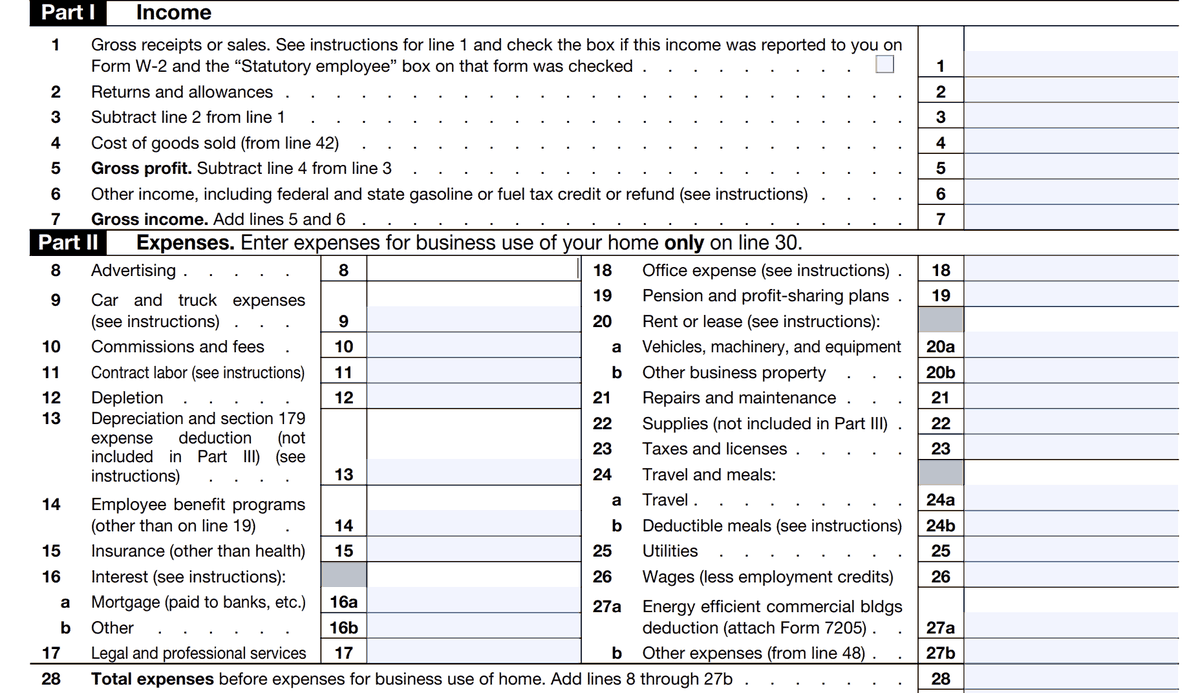
Part I wants gross receipts on line 1. Part II wants your expenses split across roughly twenty numbered lines — Advertising on 8, Insurance on 15, Office expense on 18, Utilities on 25, and anything that doesn't fit a named line grouped into Other expenses on 27b.
So the work isn't just "add up the spending." It's deciding which line each transaction belongs on.
What an organized report looks like
Here is the same information after that work is done — the income and expense summary from a Heightly report, with the Schedule C line already assigned to each category:
| Category | Sched. C line | Amount |
|---|---|---|
| Revenue | 1 | $68,000.00 |
| Advertising | 8 | $348.00 |
| Insurance (business) | 15 | $624.00 |
| Office expense | 18 | $823.17 |
| Repairs and maintenance | 21 | $144.00 |
| Supplies | 22 | $289.71 |
| Taxes and licenses | 23 | $238.00 |
| Meals † | 24b | $337.21 |
| Travel | 24a | $450.00 |
| Utilities | 25 | $1,020.00 |
| Part V — Other expenses | ||
| Dues and memberships | 27b | $198.00 |
| Other expenses | 27b | $1,322.92 |
| Software and apps | 27b | $1,200.00 |
| Total other expenses (line 27b) | 27b | $2,720.92 |
| Total expenses | 28 | $6,995.01 |
| Net income — before meals limitation and other tax adjustments | $61,004.99 |
† Meals are subject to a deductibility limitation that isn't applied to the figure shown. That's an adjustment made when the return is prepared.
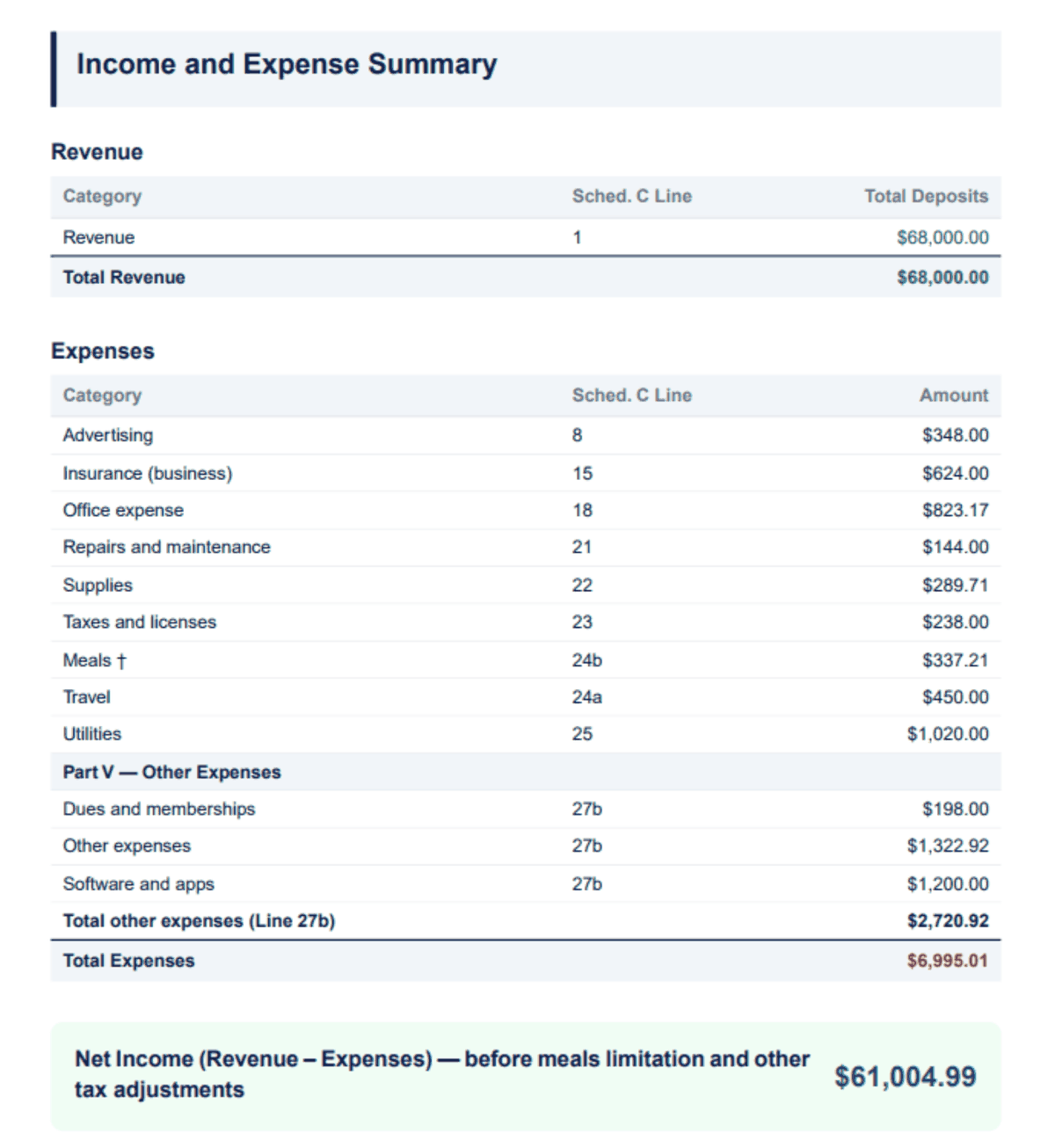
Notice the three sub-categories rolling up into line 27b. Schedule C has one "Other expenses" line, but the form expects a breakdown in Part V — so dues, software and general other expenses are tracked separately and subtotalled to the single figure the line needs.
What else the report contains
The summary above is one page of it. A report you can actually work from also needs:
- The transaction detail behind every total, so any figure can be traced back to the statement line that produced it. Totals you can't trace are totals you can't defend.
- Capital purchases listed separately. A $1,500 laptop isn't an expense on line 18 — it's depreciated. It belongs on its own schedule, not buried in office expense.
- Home office details, if you claim one, since that flows through Form 8829 rather than Part II.
- A list of what needs a decision. Bank interest, refunds and reimbursements, and anything ambiguous should be surfaced rather than quietly assigned to a category.
Upload your statements → review your transactions → download your report
The review step is the part that matters, and it isn't optional. Software can recognize a vendor and suggest a category; it can't know that one particular payment was personal, or that a deposit was a loan rather than revenue. Anything unclear gets put in front of you as a short set of questions, and your answers apply to similar transactions.
What comes out is a PDF summary and a detailed Excel workbook. Use them to complete your own Schedule C, or hand them to your tax preparer as the starting point they'd otherwise have to build themselves.
Try the free preview → — one statement, no payment details, and you'll see how your own transactions get categorized before deciding anything.
Where this fits, honestly
Heightly is software, not a bookkeeping service or a tax preparer. It organizes your statements; it doesn't file your return and it doesn't give tax advice. The report is a draft organizer — some amounts still need adjusting for personal-use portions, depreciation elections and other entries that can't be determined from bank statements alone.
It's built for unincorporated sole proprietors and freelancers filing Schedule C (Form 1040), and it isn't the right tool for corporations, partnerships or LLCs, or for very high transaction volumes.
If your bookkeeping is genuinely complex — inventory, receivables, employees, multiple entities — a bookkeeper catching up the year is the better answer, and worth the cost.
Filing in Canada? Read our guide to T2125 bookkeeping from bank statements.
This article is for general informational purposes only and is not tax, legal, or accounting advice. Rules vary by province, state, and business type, and change often — confirm details with a qualified tax professional (or the CRA / IRS directly) before filing. Heightly is software, not a tax filing service.
Turn your bank statements into a Tax Prep Report
Try Heightly free — turn your bank statements into a tax prep report in minutes.
Get started free →