What's New in Heightly: Product Updates Since Launch
Heightly launched on July 1, 2026. Since then we've shipped hundreds of improvements, most of them driven by what we saw in real statements and by feedback from sole proprietors, bookkeepers and accountants. This post covers the changes that make the biggest difference to you.
1. Upload overlapping statements without double-counting
Many people download a full-year CSV and then add monthly PDF statements for the same account, or upload the same file twice by accident. Heightly now handles all of these:
- Exact repeats are counted once, even when a file is uploaded twice under a different name.
- CSV and PDF copies of the same transaction are matched, even when the bank shows them a few business days apart or words them slightly differently (for example "Internet Banking" in one and not the other, or a city added at the end).
- Genuine repeats are kept. Two identical coffees on the same day in the same statement stay as two.
- You stay in control. The statement check page lists every pair Heightly matched. If two transactions really are separate, choose Count both. Changed your mind? Choose Count once instead.
- A warning when files don't line up. If two statements for the same dates have very few transactions in common, Heightly tells you before you pay, so you can remove the extra file.
2. More statements read correctly
We've widened the range of statements Heightly can read, in both Canada and the United States:
- More CSV layouts, including formats from Chase, Wells Fargo, PNC, US Bank and CIBC, and exports with unusual column names.
- Larger PDF statements: files over 1 MB, and up to 20 pages per file.
- Dates written with two-digit years, and CSVs that list both a transaction date and a posted date (Heightly now uses the transaction date).
- Better checks that money in and money out are read in the right direction, for both bank accounts and credit cards.
3. A clearer statement check before you pay
The page you see after uploading has been redesigned to answer one question: does this look right?
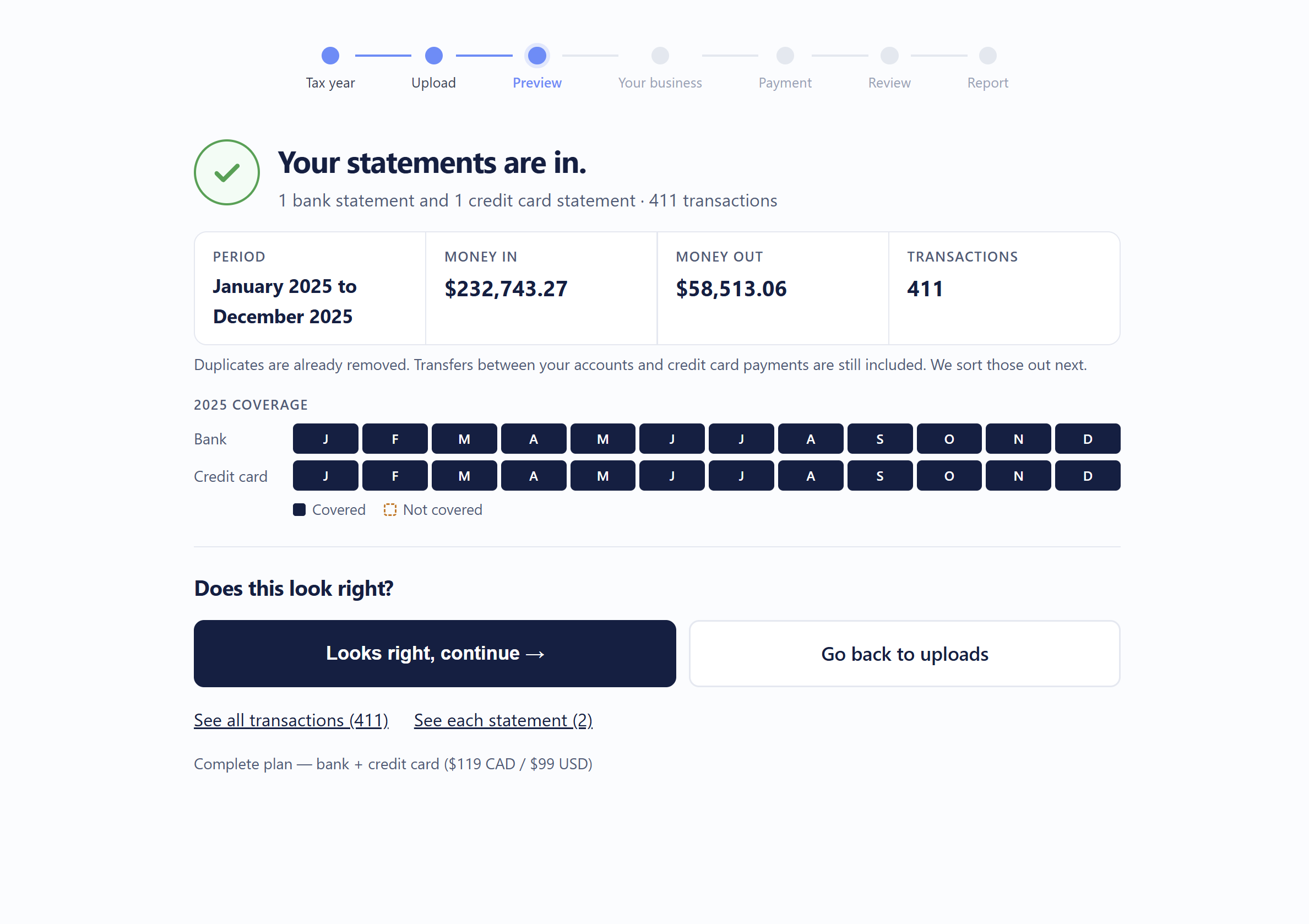
- Total money in and money out, and month-by-month coverage for each account, so missing months stand out.
- A plain check of each statement's opening and closing balance where the statement shows them.
- Short, specific notes only when something needs your attention: a gap between statements, an overlap, or a file that may be for the wrong tax year.
- Transactions dated outside your tax year are listed clearly, and in review you choose to include or leave out each one.
4. Smarter categories and fewer unnecessary questions
- Industry knowledge for accountants and tax preparers, registered massage therapists, photographers and graphic designers, including professional dues and common software.
- Subscription software isn't mistaken for equipment, so you're asked fewer capital-asset questions.
- Money moving between your own accounts (credit card payments, transfers, cash advances) is kept out of income and expenses.
- Payroll, tax instalments and owner draws are recognized and handled separately from ordinary expenses.
- Answer once, apply to similar. When you categorize a vendor in review, Heightly offers to apply it to that vendor's other transactions.
- A completeness check. Every transaction in your report is either categorized, waiting for your review, or listed for depreciation. Nothing is silently left out.
5. GST/HST and PST (Canada)
- GST/HST registrants can tell Heightly, when reviewing a purchase, whether GST/HST was actually charged, and the estimate updates.
- Purchases in foreign currency are kept out of the input tax credit estimate.
- PST rules for BC, Saskatchewan and Manitoba were reviewed category by category, and PST remittances now appear in their own section.
- If you enter PST collected, Heightly checks it against your revenue and tells you if something looks off, instead of producing negative figures.
The report's GST/HST and PST figures remain estimates to review with your accountant or against CRA guidance before you file.
6. Off-bank expenses: easier and safer
Cash purchases and business costs paid personally can be added with the off-bank expense template.
- The template's example rows are skipped automatically, so they never end up in your report by mistake.
- You can remove or replace an uploaded template file before you pay.
- The template's categories now match the tax lines on the T2125 and Schedule C.
7. United States customers
- Reports use Schedule C lines throughout.
- A 1099-NEC candidate list shows contractors you paid $600 or more, for you or your preparer to confirm.
- Payee names come through clearly, even from bank exports that hide them in an unusual column.
8. Getting back to your report
- Your report link keeps working after you start a new session.
- If your sign-in link expires, you can request a new one yourself.
- A dedicated report page lets you download your PDF and Excel files again.
9. Privacy
- Uploaded statement files are deleted on a set schedule after your report is delivered, and abandoned uploads are cleaned up automatically.
- When you ask us to delete your account, your statements, transactions and report files are all removed.
Try it
You can try Heightly free with one statement file, with no payment details needed. Start a free preview.
Heightly is software, not a bookkeeping, accounting or tax-advice service. Review every report yourself, or with a qualified tax professional, before filing.
Note for Quebec residents: The Service is not available to Quebec residents. See heightly.ai/app/quebec-not-supported for details.
This article is for general informational purposes only and is not tax, legal, or accounting advice. Rules vary by province, state, and business type, and change often — confirm details with a qualified tax professional (or the CRA / IRS directly) before filing. Heightly is software, not a tax filing service.
Turn your bank statements into a Tax Prep Report
Try Heightly free — turn your bank statements into a tax prep report in minutes.
Get started free →